Field notes / Teardowns
Warby Parker teardown: they retired Home Try-On and kept the best replacement in the app
Warby Parker sunset Home Try-On and pointed shoppers at Virtual Try-On, a quiz, and an AI Advisor. On the website, the Advisor is the piece that is missing.
Warby Parker is the rare DTC brand that is growing and profitable. Its 2025 annual report describes 13% revenue growth and its first full year of net income. It also made a big call on its own website: it ended Home Try-On, the program that mailed you five frames to try before you bought. Its Home Try-On page now says the program "has come to an end" and points to three replacements: Virtual Try-On, a style quiz, and Advisor, which the page calls an "AI-powered tool in our iOS app."
That decision shows up in the numbers. On the Q2 2026 earnings call, the CFO said e-commerce revenue was $58.7 million, down 0.3% year over year, because the company was lapping a period that still included Home Try-On. Co-CEO Dave Gilboa said on the same call that, excluding that impact, e-commerce glasses and contacts order volume grew low double digits.
So the question for the website is simple. Does it give a web shopper the same confidence the box of five frames used to give? I went through warbyparker.com on October 28, 2026 and took screenshots to find out.
What Warby Parker does well
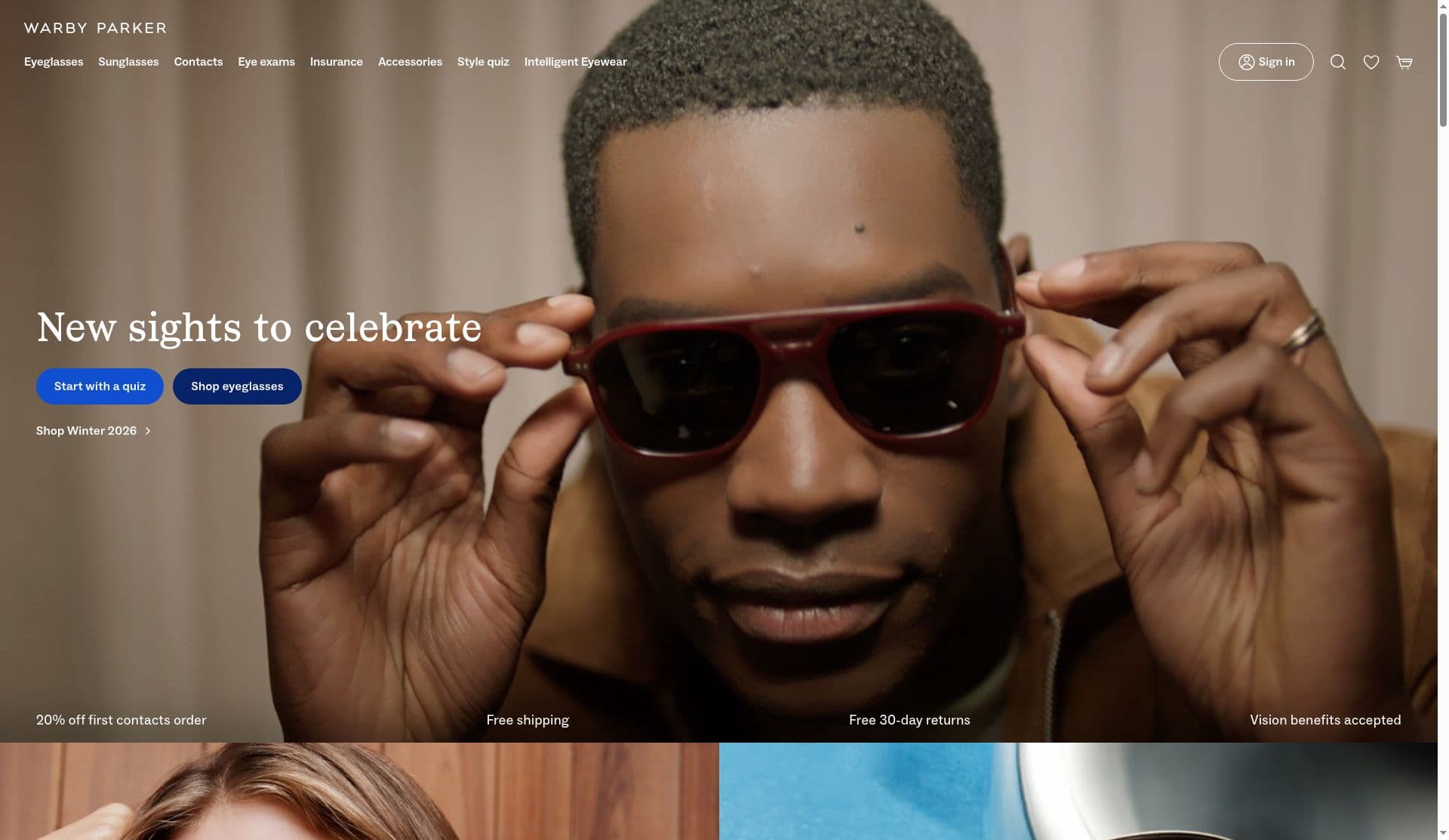
The homepage starts with the decision, not the catalog. The hero has two buttons: "Start with a quiz" and "Shop eyeglasses" (screenshot taken Oct 28, 2026). For a product where most people do not know their frame size or shape, leading with a guided path is the right default.
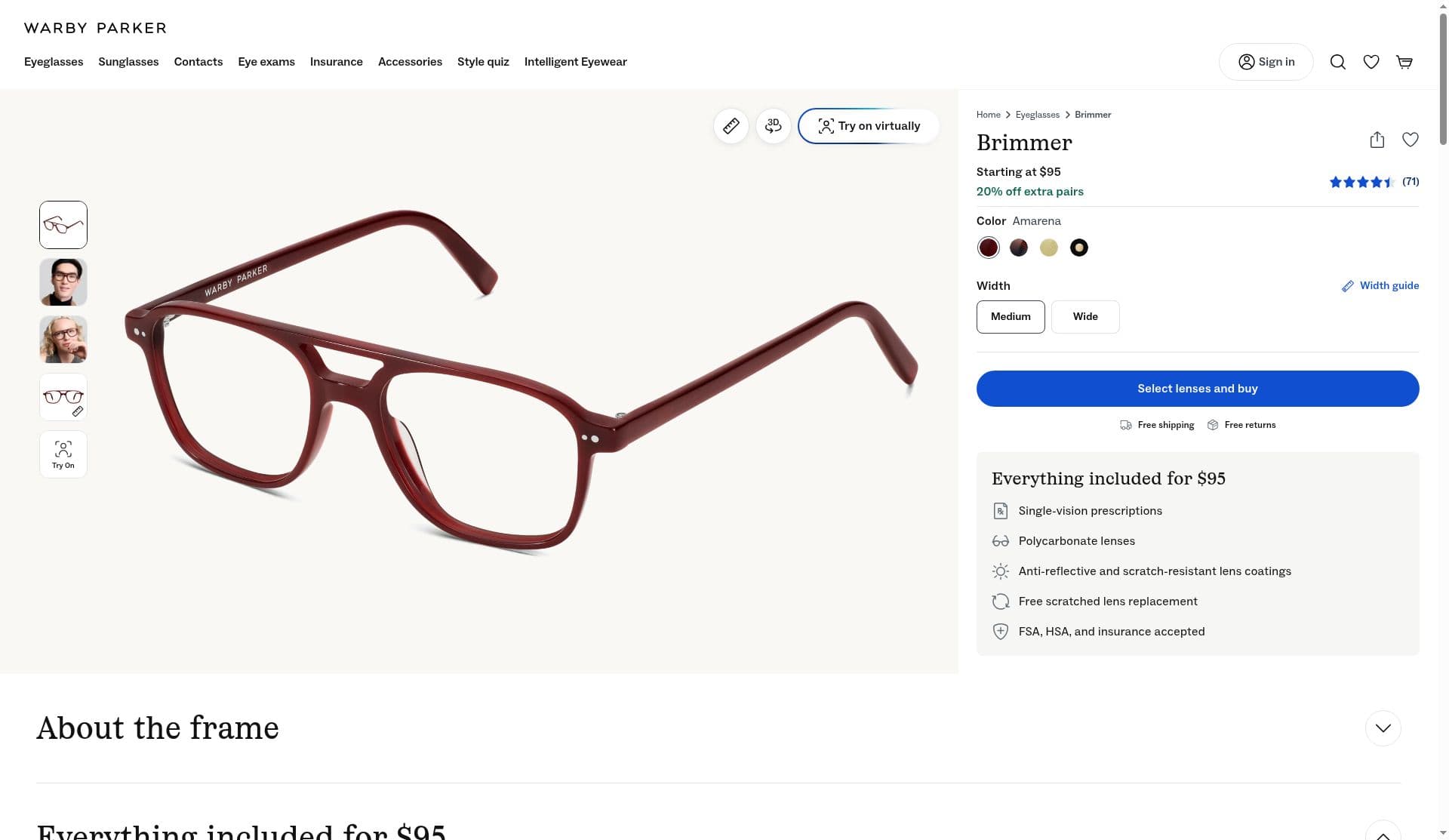
Virtual Try-On is one click from every frame. On the Brimmer product page, "Try on virtually" sits right on the product image, and there is a Try On thumbnail in the image rail (screenshot taken Oct 28, 2026). The page also shows widths (Medium and Wide), a width guide, and a clear "Everything included for $95" box listing lenses, coatings, and FSA, HSA, and insurance acceptance. That is a lot of anxiety removed in very little space.
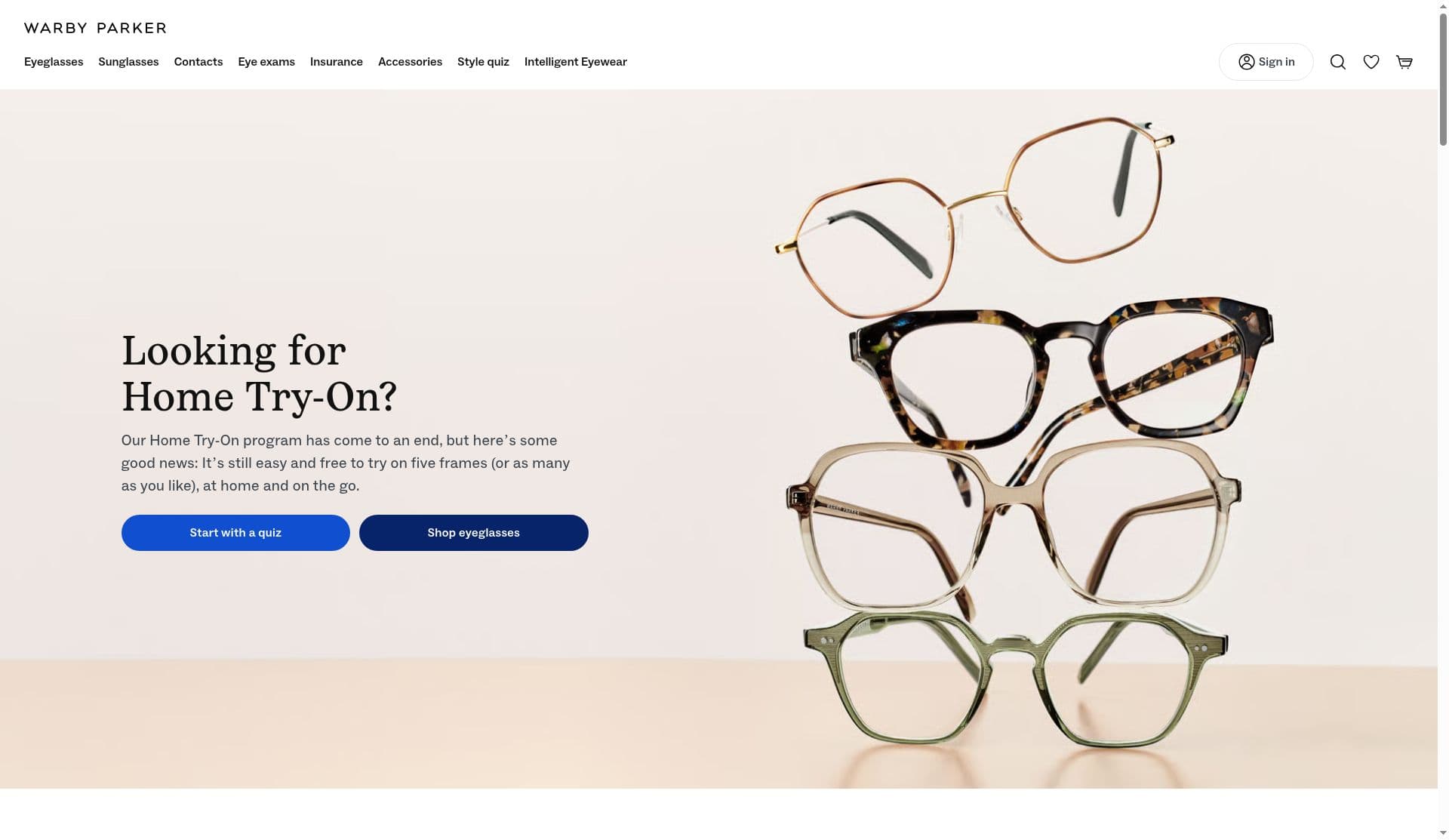
They are honest about the change. The old Home Try-On URL still works and says plainly that the program ended (screenshot taken Oct 28, 2026). A lot of brands would have redirected it to the homepage and hoped nobody noticed.
They are already thinking about AI as a product, not just a feature. "Intelligent Eyewear" is in the main nav (screenshot taken Oct 28, 2026), and the 10-K describes AI glasses partnerships with Google and Samsung. On the Q2 call, management said customers will be able to demo the glasses across its store fleet this fall.
What Warby Parker does badly
The AI that replaces the human part of Home Try-On is not on the website. Home Try-On was never really about shipping. It was about time and a second opinion: you tried five frames, asked someone in your house, and decided. Virtual Try-On covers the "how does it look" part. The quiz covers "where do I start." Advisor is the piece that covers "help me decide," and the Home Try-On page itself says it lives in the iOS app. I did not see it anywhere on the web pages I captured (screenshots taken Oct 28, 2026).
The Home Try-On page is a dead end for the people who land on it. Someone typing that URL wants a specific thing: try a few frames before paying. The page I captured gives them a headline, a paragraph, and the same two buttons as the homepage, "Start with a quiz" and "Shop eyeglasses" (screenshot taken Oct 28, 2026). The replacement options are listed further down the page, but nothing maps them to the steps the visitor already knows.
There is no shortlist on the product page. Home Try-On forced a shortlist of five. The product page I captured has a heart icon to favorite a frame, but nothing on the page treats "I am comparing a few frames" as the normal state it is for glasses (screenshot taken Oct 28, 2026).
How I'd improve it
My opinion: Warby Parker does not need more AI. It needs the AI it already built to show up on the surface where the Home Try-On shopper now lands.
1. Put Advisor on the web product page. The product page already knows the frame, its widths, and what $95 includes. An Advisor panel there can answer "is this frame right for me" with the facts on the page, then hand off to Virtual Try-On or to a store. The Q2 call says nearly two thirds of the US population lives within 30 minutes of a Warby Parker store, so "try it in person" is a real next step for most people asking.
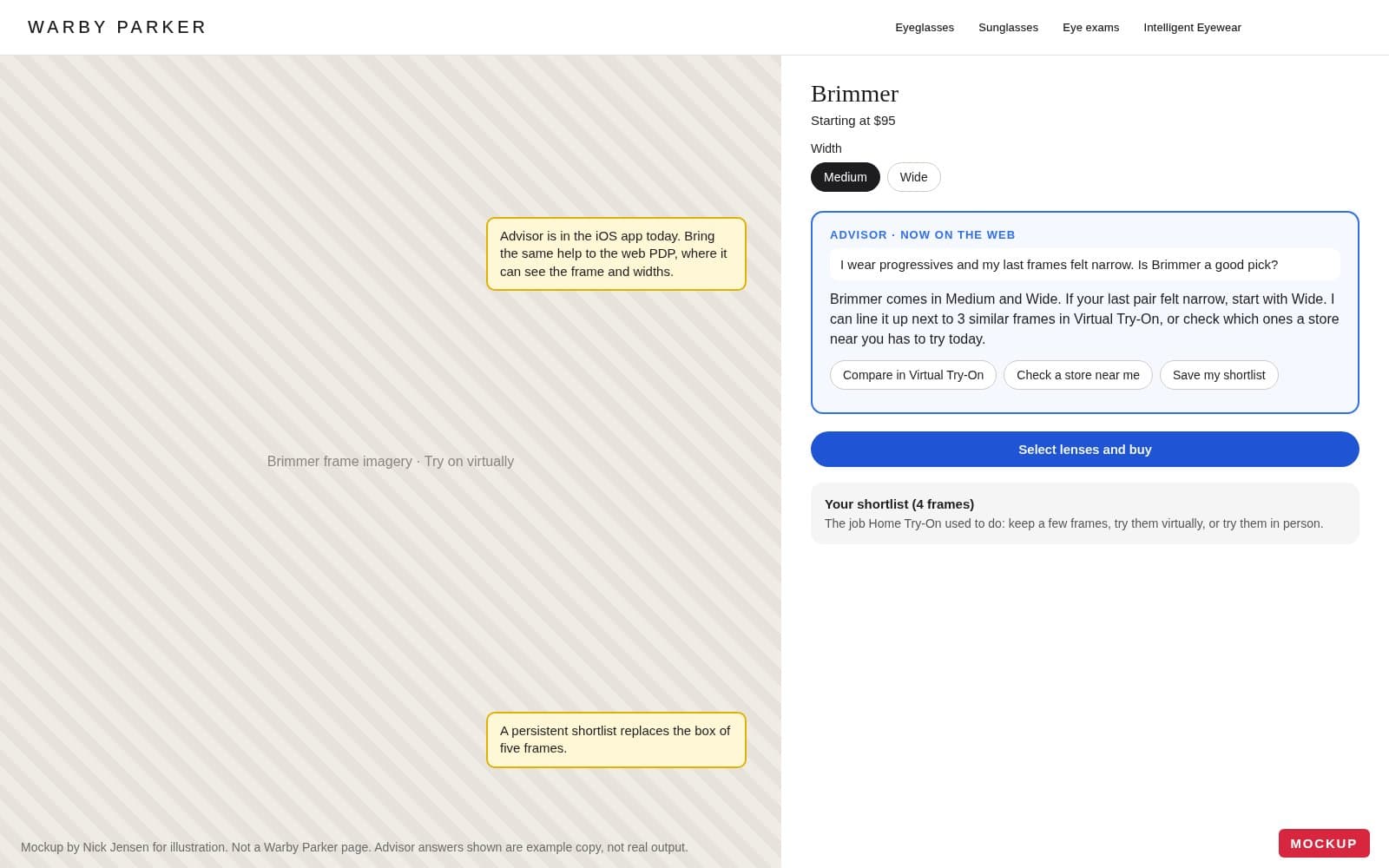
2. Make the shortlist the replacement for the box. Let people save a handful of frames, flip through them side by side in Virtual Try-On, email the list to themselves, or see which nearby store has them. That is the Home Try-On job without the shipping cost.
3. Rebuild the Home Try-On page as a guided path. Turn it into three steps that mirror the old program: build a shortlist, try it on virtually, try it in person. Each step is a button, and the first one starts the quiz or Advisor.
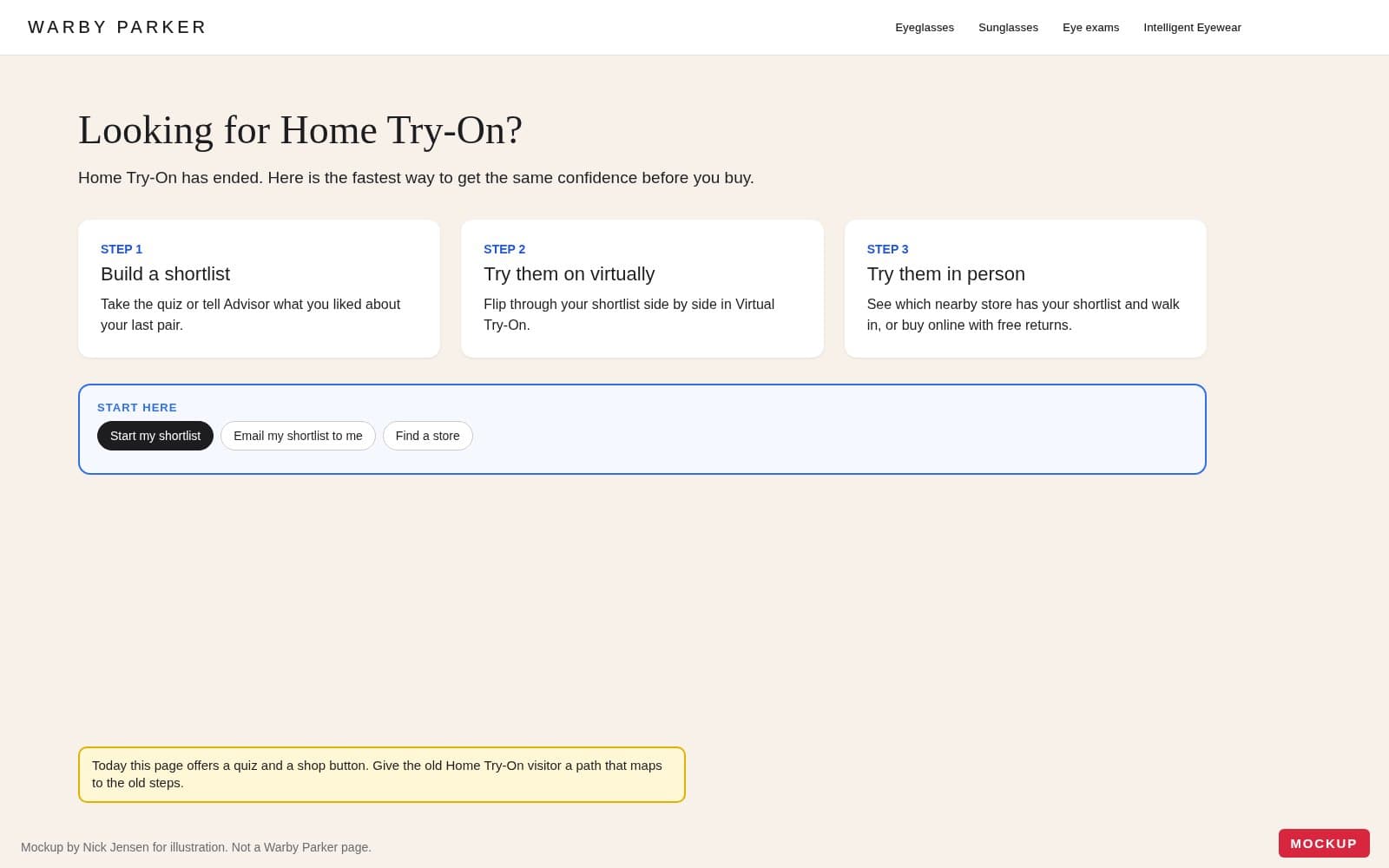
4. Measure it against the old program. Warby Parker has years of Home Try-On data. I would compare shortlist users against the historical Home Try-On conversion and return rates before deciding whether the web Advisor is worth expanding. That tells you whether the replacement is actually replacing anything.
Technology detected
I fetched warbyparker.com on October 28, 2026. The homepage and the Brimmer product URL returned 403. The notes below come from the /cart.js route, which returned a full Next.js cart page, plus response headers, script hosts, and cookies. I left out anything I could not verify on that page.
Warby Parker storefront stack, checked Oct 28, 2026
| Piece | What I found | Evidence |
|---|---|---|
| Ecommerce | Custom storefront, not Shopify | /cart.js returns a Next.js HTML cart page, not Shopify cart JSON. There is no powered-by: Shopify header. /products.json also did not return a Shopify catalog. |
| CDN / hosting | Vercel behind Cloudflare | The cart response includes x-vercel-id and x-vercel-cache. The HTML has a Vercel data-dpl-id. Server is cloudflare with a cf-ray. Images are referenced from img.warbyparker.com and i.warbycdn.com. |
| Frontend | Next.js | The cart page links /_next/static assets, sends next-router Vary headers and x-matched-path, and includes a turbopack runtime chunk. |
| Reviews | Bazaarvoice | The cart page dns-prefetches apps.bazaarvoice.com. |
| Analytics | Google Tag Manager | The cart page includes googletagmanager.com/ns.html?id=GTM-N29SR4. |
| Bot protection | DataDome | The cart page preloads https://js.datadome.co/tags.js. The homepage and product URL returned 403 to the same fetch. |
| Feature flags | DevCycle | The React payload includes InternalDevCycleClientsideProvider. |
| AI on the web | Not present on the pages I captured | Warby's Home Try-On page, screenshot from Oct 28, 2026, says Advisor is an AI-powered tool in the iOS app. I did not find an Advisor script on the web cart page. |
Engineer's take
This is a storefront they own. Next.js on Vercel is why Virtual Try-On and the quiz can be first-class routes instead of apps bolted onto a theme. That is the easy part.
The friction is that the same app can host Advisor and does not. Feature flags through DevCycle make it simple to keep a web Advisor off. DataDome in front of Cloudflare is why an unauthenticated fetch of the homepage gets 403. That is fine for bots. It is also a reminder this stack is guarded like a product, not like a brochure.
What I would watch: third parties on the cart page already include GTM, Bazaarvoice, and DataDome. A web Advisor should read frame width, price, and store distance from the product page, not add another tag manager pixel. Image hosts on warbycdn.com are the right shape. Keep the Advisor payload in the Next.js app.
Architect's take
The structural move is to put Advisor on the same Next.js product page that already has width, the $95 box, and Virtual Try-On. Shortlist should be state in that app, not a heart icon. That is not a new vendor. It is using the web stack they already operate for the job Home Try-On used to do.
The AI opportunity is at that layer: one web path that can compare a few frames, try them on, and point to a store. The iOS Advisor can stay. The website is the surface that lost the box.
If you run a commerce brand and want this kind of review pointed at your own store, it is what my AI Opportunity Teardown is for. For $2,000 I spend a week on your site and data, and you get a written one-pager and a 15-minute Loom walking through where AI would actually move revenue and where it would not.
From the idea to the work
Make the workflow useful in a real product.
Bring a product idea, an internal tool, or an AI-assisted workflow that needs a working implementation.